Unix-Like OS
I personally think that Unix-like operating systems are necessary to dive into the scientific computing. For novices, Mac OS is a optional way to have a "ready-to-go" powerful system based on UNIX. For a long term investment, it's worth to learn Linux, especially for diving into distributed/parallel computing, deploy servers and so on. But MacBookPro is still a good laptop option to develop algorithms and software.
Evolution of Unix and Unix-like systems
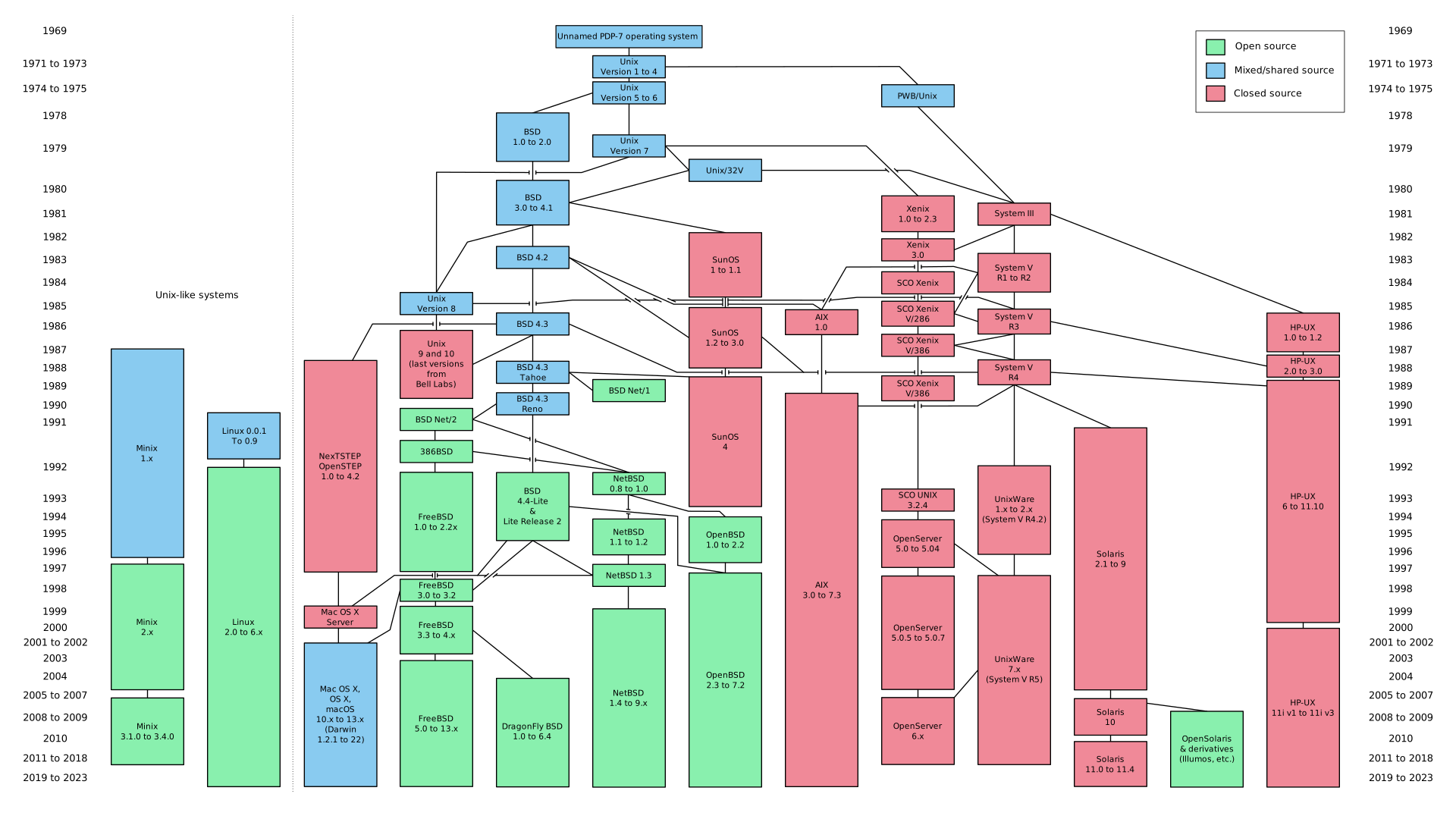
Simplified history of Unix-like operating systems

Ultimate Scientific Linux Distributions
It's not surprised that Linux still powers the servers and workstations of the world's biggest research organization. There are indeed exist some scientific Liux distros, which often offer pre-installed software for various research purposes. Although we can transform the regular Ubuntu into a scientific distro by installing same apps, but it take much time. Maybe someday I will have a try of these scientific Linux Distros:
Bio-Linux

This green-colored distro is aimed at scientists who work in bioinformatics — an interdisciplinary field that combines molecular biology and genetics with statistics and analysis methods from computer science. Developed at the Environmental Omics Synthesis Centre in the UK, Bio-Linux is supported and funded by the Centre for Ecology & Hydrology (CEH) and Natural Environment Research Council (NERC).
Poseidon Linux
 Like Bio-Linux, Poseidon Linux also has a color scheme: gentle blue tones that match its marine name. The branding was inspired by oceanologists who work on the project, but Poseidon Linux is not for just one branch of science. Instead it offers a wide range of tools, from 2D and 3D visualization, genetics, and programming apps to support for statistics, numerical modeling and mapping.
CAElinux
 The clue is in the name: CAE stands for Computer-Aided Engineering, and this scientific distro is perfect for anyone who works with CAD, modelling, prototyping, 3D printing, and physics simulations. Developed in Switzerland, CAElinux is based on Xubuntu 12.04 and requires a 64-bit system. It doesn’t offer any desktop flavors apart from Xfce, but its software selection is impressive.
Scientific Linux
 After all these *buntu-based distros, Scientific Linux is a true combo-breaker: it’s a rebuild of Red Hat Enterprise Linux. Latest version (7.1, codenamed Nitrogen) came out just recently, in three flavors—KDE, GNOME, and IceWM—for 64-bit systems only. However, its base is not the only thing that makes Scientific Linux stand out. Unlike other distros which are brimming with scientific software, Scientific Linux offers only a basic set of apps. What a sneaky, misleading distro!
Fedora Scientific
 This Fedora spin represents the middle ground between a highly specialized and an ordinary Linux distribution. As such, it’s great for researchers and students of all scientific backgrounds, although it slightly leans in favor of numerical-based research. The default desktop environment is KDE, and Fedora Scientific is available for both 32-bit and 64-bit architectures. It’s developed by Amit Saha with the support of Fedora Science and Technology SIG. Beautiful online documentation will introduce you to Fedora Scientific and guide you through its software selection.